 06:32
06:32
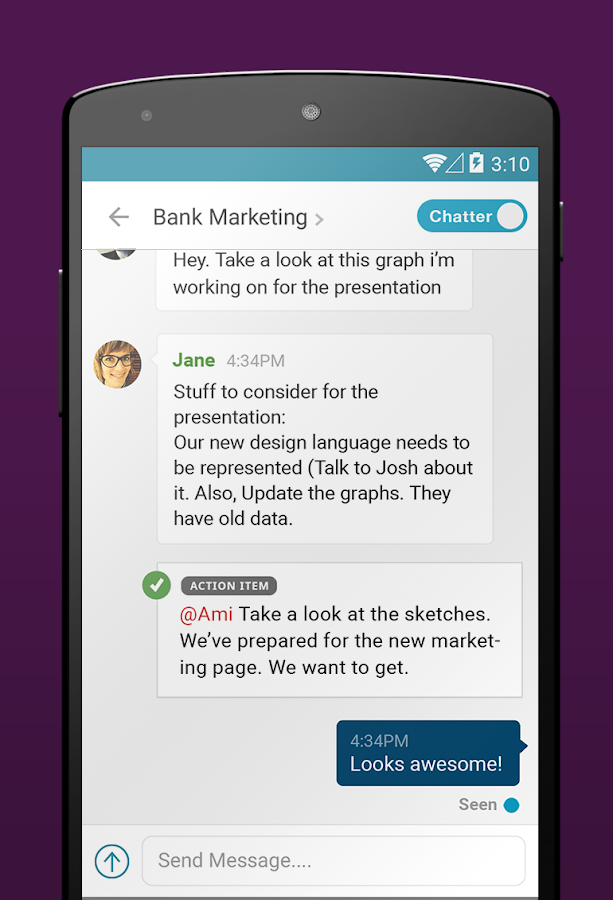
WorkGroup lets you communicate in real time with people from any country.
WorkGroup by TL;DR Applications is a free
multi-platform chat and productivity app aimed at, as the name implies, groups
of people working together on a task. At the same time, the inherent
functionality of the app ensures that it doesn't have to be used only for work
related purposes, but any project that involves coordinating notes and tasks.
To start using WorkGroup you'll need to create a
group which is as simple to do as tapping a plus sign on the WorkGroup page.
The app will have already prompted you to log in with your email address and
assuming you gave permission for it to look at your contacts all you have to do
is start typing a would be teammate's coordinates and autofill kicks in.
Once you have created a group you have two basic
options. You can use the app as a chat client or you can use it as a task
manager and coordinator.
You chat with groups from the same location -
just select your WorkGroup and start typing. To reach out to someone not
currently in your group navigate to the Contacts tab on the bottom of your
screen.
From there you can see all of the contacts that
already gave WorkGroup permission to import. Beside every potential connection
is a box with CHAT written within - tap that and you've one-on-one
conversation.
If you are reaching out to a fellow app user they
will be notified via push notifications. But even if you text someone who
doesn't use WorkGroup they will get an email letting them know you reached out.
They can even reply from the email and/or web directly if they don't want to
download the app, a feature which I think most other developers should
implement.
Working in an Indian MNC can be tough, what with
collaborating with different team members and people from other departments. WorkGroup
makes it stress-free for everyone in a group to see what has been accomplished,
and what remains to be done, and by whom. Anyone can add a task and assign it
to themselves or another member.
To create a task, you need to select the goup
that it is intended for and then tap the task button. You’ll be prompted to add
details like task name, who is responsible for it and when it’s due.
Where WorkGroup shines is in its ability to keep
your conversations and tasks together in one place without overwhelming you
with information you don’t need on your screen.
There is a toggle in the upper right hand corner
where you can choose to view a task with or without the accompanying text
messages. This is ideal both if you are looking for a specific comment someone
made and for when you want to focus on a solo task with minimal distractions.
PROS
·
Completely
free
·
Multi-platform
with free desktop and web access
·
Highly
streamlined
·
Easy to
learn and use
CONS
·
Might be
overtly simple for enterprise use
WorkGroup is a winner. With no micro-transactions
or ads just the fact that it works as advertised is, frankly, astonishing. Its
simplicity and ease to use in a minimalistic but intuitive attractive GUI is
even better.
But the best part is how seriously WorkGroup
works on Android and iOS, in your web browser and on your desktop PC running
Windows or OS X. If you have group project at work, for school or if you are
planning an event, WorkGroup can help keep your team on task and on time from
whatever device individual members prefer.
So head over Here to download :- https://mobiles10.info/app/workgroup/co.xros.xros/download/
PROS
·
Completely
free
·
Multi-platform
with free desktop and web access
·
Highly
streamlined
·
Easy to
learn and use
CONS
·
Might be
overtly simple for enterprise use
WorkGroup is a winner. With no micro-transactions
or ads just the fact that it works as advertised is, frankly, astonishing. Its
simplicity and ease to use in a minimalistic but intuitive attractive GUI is
even better.
But the best part is how seriously WorkGroup
works on Android and iOS, in your web browser and on your desktop PC running
Windows or OS X. If you have group project at work, for school or if you are
planning an event, WorkGroup can help keep your team on task and on time from
whatever device individual members prefer.

No comments
Post a Comment